















Overview:
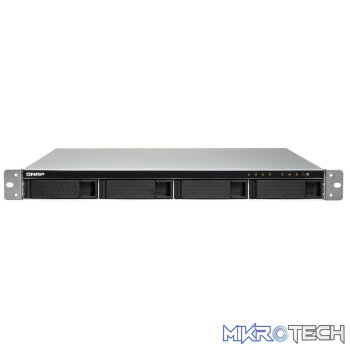
The TS-432XU-RP is built to deliver high performance, flexible expansion capabilities and versatile applications at an affordable and cost-effective price for small/medium-sized businesses. Two 10GbE SFP+ ports are capable of high-speed transmission of time-critical business data and a PCI Express (PCIe) 2.0 ×2 slot (×4 length) provides flexibility for expanding connectivity and/or storage with M.2 SATA/PCIe NVMe SSDs, via QNAP’s QM2 expansion cards. The TS-432XU-RP can be deployed to suit various needs for data storage, file backup, disaster recovery, containerized applications, surveillance, and more. The TS-432XU-RP is also equipped with a redundant power supply to ensure uninterrupted services.
Features:
A solid storage for everyday needs
The TS-432XU-RP is equipped with a AL-324 quad-core 1.7 GHz platform-on-chip (PoC), from the Alpine V2 AL3 product family powered by Annapurna Labs, an Amazon company. The included 2 GB RAM can be upgraded to a maximum of 16 GB for futureproofing its capabilities. With 10GbE connectivity and PCIe expansion, the TS-432XU-RP can provide performance of up to 1726 / 684 MB/s (unencrypted) and 1189 / 443 MB/s (with hardware-accelerated AES-256 volume encryption) to significantly boost business operations.
Built-in 10 GbE SFP+ ports accelerate your workflows
With two built-in 10 GbE SFP+ ports, the TS-432XU-RP can immediately take advantage of high-speed 10GbE network infrastructure. The 10 GbE SFP+ ports can empower bandwidth-demanding tasks including databases, virtual machine storage, and large data backups.
One PCI Express slot gives you expandability and flexibility
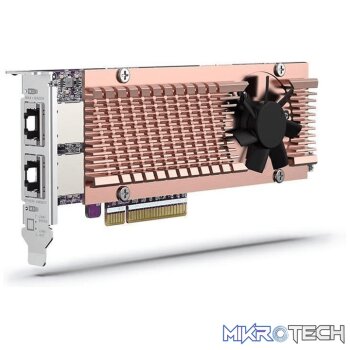
The TS-432XU-RP provides one PCI Express (PCIe) 2.0 ×2 slot (×4 length) for expanding NAS functionality, such as installing additional 10GBASE-T ports and M.2 SSDs (both SATA and PCIe NVMe*). QNAP offers a complete array of expansion cards for you to take advantage of the TS-432XU-RP’s PCIe expandability, including QM2 expansion cards and single/dual port NICs.
Snapshots and Hybrid Backup Sync secure your data
A well-rounded disaster recovery plan requires multiple layers of protection and backups to deliver peace of mind. The TS-432XU-RP supports snapshots to manually/automatically record the content of files and changes to them at the block level, allowing them to be quickly reverted in the event of corruption or accidental deletion. For added data security, the Hybrid Backup Sync app can help back up, restore and sync files to/from local external devices, remote NAS and public cloud services.
Cross-platform file sharing and Qsync facilitate convenient file exchange
The TS-432XU-RP supports SMB/CIFS, NFS, and AFP protocols for file sharing across Windows, Mac, Linux/UNIX networks. Data can be centrally stored on NAS and protected by rigid security measures provided by the TS-432XU-RP. The Windows AD and LDAP services enable system administrators to configure user permissions by using an existing Windows AD server, LDAP server or built-in LDAP service. To sync data across devices, including mobiles, simply install Qsync Central on NAS and Qsync clients on other devices to enjoy a fast, private, secure, and real-time file sync service with the TS-432XU-RP.
Windows and Mac backups help keep data security in the workplace
The TS-432XU-RP can handle file backup tasks from Windows® PC and Mac. By using QNAP’s NetBak Replicator backup utility, with a few simple clicks, you’re all set. For macOS users, Time Machine can be set up to save to the TS-432XU-RP. Combined with snapshots and Hybrid Backup Sync, the TS-432XU-RP provides the solid foundations of a disaster recovery plan.
QTS & App Center open endless possibilities
QTS, the QNAP NAS operating system, provides numerous functionality additions and improvements, such as the revamped Qtier, RAID 50/60 support, Qboost, OCR Converter, and much more. More apps are available from the QTS App Center, such as Domotz, QVPN Service, and more. You can easily take advantage of apps from QNAP and trusted third parties to expand NAS functionality and possibilities.
Secure your premises with integrated surveillance solutions
The TS-432XU-RP provides an intelligent surveillance management system for real-time monitoring, video & audio recording, and playback to safeguard your work environment. You can even use USB webcams as affordable IP cameras with the free QUSBCam2 app. The TS-432XU-RP also supports QVR Pro, the next-generation QNAP NVR system, that allows you to arrange a dedicated, independent storage space for surveillance data on the NAS and leverage the advantages of scalability and storage manageability from QTS.
Protect your NAS content with encryption and more security features
The AL-324 PoC of the TS-432XU-RP supports hardware-accelerated AES-256 encryption of volumes, shared folders and LUNs to provide data confidentiality without sacrificing performance. Other security features include IP address filtering, virus and malware scan, and much more. You can also set access permissions to ensure only authorized users or apps can access specified folders. The QVPN Service, available from the App Center, can be utilized to deploy VPN connections to secure communications between your devices and NAS.
Virtual JBOD and expansion units help share and expand storage space
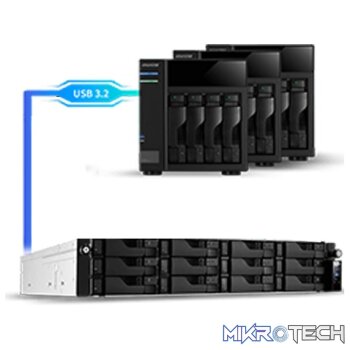
The TS-432XU-RP supports connecting a UX-800U-RP (8-bay) or UX-1200U-RP (12-bay) expansion enclosure to scale up the total storage space. The unused storage space on the TS-432XU-RP can also be used to expand the capacity of other QNAP NAS by using QNAP’s Virtual JBOD (VJBOD).
Redundant power for dependable services
The TS-432XU-RP is equipped with a redundant power supply to ensure the maximum uptime of services for achieving high reliability. Combined with dual 1000BASE-T and dual 10GbE SFP+ ports, your businesses can easily maintain 24/7 operations, guaranteeing a cost-effective and reliable storage solution.
| CPU | Annapurna Labs Alpine AL-324 ARMv8 Cortex-A57 quad-core 1.7 GHz processor Architecture: 64-bit Encryption Engine: Yes |
|---|---|
| System Memory | 2 GB DDR4 (1 x 2 GB) |
| Maximum Memory | 16 GB (1 x 16 GB) |
| Memory Slot | 1 x DDR4 Long-DIMM slot |
| Drive Bay | 4 x 3.5-inch SATA 6 Gbps bays |
| Drive Compatibility | 3.5-inch SATA hard disk drives 2.5-inch SATA hard disk drives 2.5-inch SATA solid state drives |
| SSD Cache Acceleration Support | 3.5-inch bays 1 to 4 Optional: SSDs on an optional QM2 PCIe expansion card |
| 10 Gigabit Ethernet Port | 2 x 10GbE SFP+ |
| Gigabit Ethernet Port | 2 x RJ45 |
| USB Port | 4 x USB 3.1 Gen 1 Type-A |
| PCIe Slot | Slot 1: 2.0 x2 |
| Form Factor | Rackmount |
| Dimensions (H x W x D) | 44 x 439 x 499 mm 1.73 x 17.28 x 19.65 inch |
| Net Weight | 9.16 kg (20.19 lbs) |
| Power Supply Unit | 2 x ATX 250 W, 100 – 240 V AC, 50/60 Hz, 5A – 2.5A |
| Power Consumption (W) | HDD sleep: 35.116 W In Operation: 48.751 W |
| Fan | 2 x 4 cm fans (12 V DC) |
| Sound Level | 38.9 dB(A) |
| Operating Temperature & Relative Humidity | 0 ~ 40°C ( 32°F ~ 104°F ), 5 ~ 95% RH non-condensing, wet bulb temp.: 27°C (80.6°F) |
| Operating System | QTS 4.3.4 (embedded Linux) |
| Supported Client Operating Systems | 1. Apple Mac OS 10.7 or later 2. Linux and UNIX 3. Microsoft Windows 7, 8, and 10 4. Microsoft Windows Server 2003, 2008 R2, 2012, 2012 R2 and 2016 |
| Supported Browsers | 1. Apple Safari 7 or later 2. Google Chrome 3. Microsoft Internet Explorer 10 or later 4. Mozilla Firefox |
| Supported Languages | Chinese (traditional and simplified), Czech, Danish, Dutch, English, Finnish, French, German, Greek, Hungarian, Italian, Japanese, Korean, Norwegian, Polish, Portuguese (Brazil), Romanian, Russian, Spanish, Swedish, Thai, and Turkish |
| Supported File Systems | 1. Internal hard drive (EXT4) 2. External hard drive (EXT3, EXT4, NTFS, FAT32, HFS+, and exFAT) Note: To use exFat you must purchase an exFAT driver license from License Center. |
| Network & Virtual Switch | 1. TCP/IP: Dual stack (IPv4 and IPv6) 2. Jumbo frame (failover, multi-IP settings, port trunking/NIC teaming) 3. DHCP server and client 4. USB Wi-Fi adapter Note: This feature does not support ad hoc networks because of security considerations. 5. Virtual switch Virtual switch editing in Virtualization Station Combining virtual machines and containers in the same virtual switch Network Address Translation (NAT) Spanning Tree Protocol (STP) 6. WirelessAP Station |
| Security | 1. Network access protection with auto-blocking (SSH, Telnet, HTTP(S), FTP, CIFS/SMB, and AFP) 2. Host access control for shared folders (CIFS/SMB) 3. AES 256-bit folder-based and volume-based encryptions which are validated by FIPS 140-2 CAVP (Cryptographic Algorithm Validation Program) 4. 256-bit external drive encryption (AES) 5. Importing of SSL certificates from Let’s Encrypt 6. Instant alerts through email, SMS, push service, audio, and LCD panel 7. 2-step verification |
| Storage Management | 1. Storage space utilization monitoring 2. Flexible volumes and LUNs with thin provisioning and space reclaiming 3. Supported RAID types 4-bay: RAID 0, 1, 5, 6, 10, JBOD, Single 8-bay (and above): RAID 0, 1, 5, 6, 10, 50, 60, JBOD, Single 4. RAID hot spare and global hot spare 5. RAID rebuild speed customization 6. Advanced secure data erase 7. Storage pools 8. Qtier Technology (automated storage tiering) Automatic or scheduled data tiering IO-aware auto tiering Shared folder tiering on demand 9. Snapshots The maximum number of snapshots varies depending on installed memory. Volume and LUN snapshots Snapshot Dashboard Snapshot Manager Snapshot cloning Snapshot Vault Snapshot Replica Unified Snapshot Directory Support for Windows Previous Versions (CIFS/SMB) Snapshot Agent for Microsoft Windows and VMware vSphere Max. snapshots (per volume or block-based LUN/per NAS): 32/64 for 2 GB models, 64/256 for 4 GB models 10. Online volume expansion 11. Online storage pool expansion 12. Online RAID capacity expansion 13. Online RAID level migration 14. SMART data migration 15. Storage expansion using QNAP expansion units 16. JBOD enclosure roaming 17. SSD read-only or read-write cache Note: The maximum cache size depends on installed memory. 18. Bad block scan and hard drive S.M.A.R.T test. 19. Bad block recovery and RAID recovery 20. Bitmap support |
| iSCSI (IP SAN) | 1. iSCSI targets with multiple LUNs per target Note: The maximum number of targets is 256. 2. LUN mapping and masking 3. Online LUN capacity expansion 4. SPC-3 persistent reservation 5. MPIO & MC/S 6. iSCSI LUN backup, one-time snapshot, and restoration 7. Virtual disks using iSCSI initiator Note: The maximum number of virtual disks is eight. 8. Stack chaining master |
| Power Management | 1. Wake-on-LAN (WoL) 2. Standby mode for internal drives 3. Scheduled power on and off 4. Automatic power on after power recovery 5. USB and network UPS support with SNMP management |
| Access Rights Management | 1. Multiple user creation 2. User data importing and exporting 3. User quota management 4. Local user access control (AFP, CIFS/SMB, FTP, and WebDAV) 5. Application access control (File Station, Music Station, Photo Station, and Video Station) 6. Subfolder permissions (AFP, CIFS/SMB, FTP, and File Station) |
| Domain Authentication | 1. Microsoft Active Directory (AD) and domain controller support 2. LDAP server and client 3. Domain user login (AFP, CIFS/SMB, FTP, and File Station) |
| myQNAPcloud | 1. Free host name registration (DDNS) 2. Optional myQNAPcloud SSL certificates (DDNS) 3. Auto router configuration using UPnP 4. Web-based file manager with HTTPS 2048-bit encryption 5. CloudLink for remote access without complex router setup |
| Qsync | 1. File syncing across multiple devices with SSL secure connection 2. Selective synchronization for specific folders or subfolders 3. Team folders as file center for better collaboration 4. File sharing using email links 5. Policy settings for conflicting files and file type filter 6. Version control for a maximum of 64 versions 7. Unified privilege and configuration management 8. Central configuration mode 9. Remote erase and restore 10. Windows and Mac OS support |
| Resource Monitor | 1. Monitoring of NAS system resources such as CPU, memory and network 2. Monitoring of NAS storage resources such as volumes, RAID, and disk activity 3. Monitoring of NAS application resource use 4. Creation of extra swap space when SSDs are installed |
| Helpdesk | 1. Reporting of issues to the QNAP support team, with automatic collection of system information 2. Remote connection between QNAP support engineers and NAS for issue resolution (with user permission) |
| Web Administration | 1. Multi-window, multitasking system management 2. Smart toolbar and dashboard for system status display 3. Dynamic DNS (DDNS) 4. SNMP versions 2 and 3 5. Resource monitor 6. Network recycle bin Recover files deleted using AFP, CIFS/SMB, and File Station Automatic cleanup File type filter 7. Comprehensive logs (events and connections) 8. Syslog server and client 9. Backup and restoration of system settings 10. Qmanager: Mobile application for remote system monitoring and management 11. Qboost |
| File Server | 1. File sharing across Windows, Mac, and Linux/UNIX 2. Microsoft networking 3. Windows ACL 4. Advanced folder permissions (AFP, CIFS/SMB, and FTP) |
You must be logged in to post a review.
Questions & Answers
There are no questions yet. Be the first to ask a question about this product.







































































































































Reviews
Clear filtersThere are no reviews yet.