











Product Description
Overview:
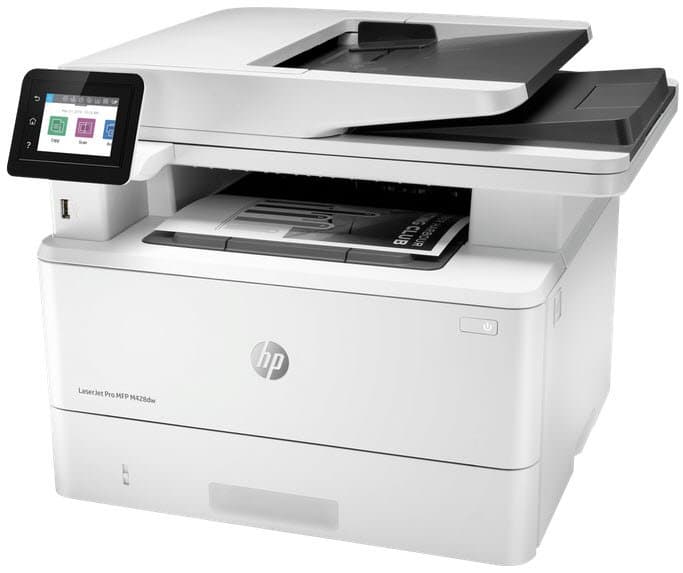
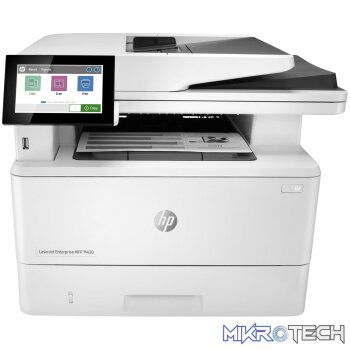
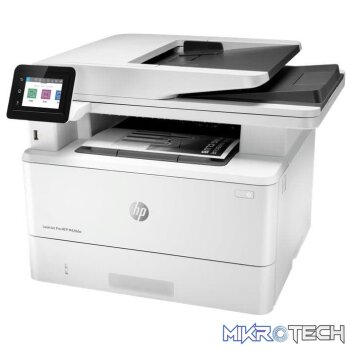
Winning in business means working smarter. The HP LaserJet Pro MFP M428 is designed to let you focus your time where its most effective growing your business and staying ahead of the competition. Ideal for teams of 3-10 people printing up to 4,000 pages per month that need to complete a range of tasks quickly while guarding against threats.
Features:
- Enhanced workflows
- Wi-Fi Dual-band
- Enhanced security
- Bluetooth Low-Energy for HP Roam for Business
- New user interface
- Energy efficient
- Todays businesses are always on, and always connected. Choose an MFP that can keep up with how you actually work, collaborate, and get things done.
- HP Print Security isnt just about securing printers. Its about helping to secure your network with real-time threat detection, automated monitoring, and software validation designed to detect and stop an attack as it happens.
- You have enough to worry about each day. Its easy to accomplish what you need and exceed your own expectations with a streamlined MFP thats made for simple use.
- Business is all about resource management, and finding efficiencies is everyones responsibility. HP LaserJet MFPs are designed with the environment in mind, so you can handle what you need while conserving energy wherever possible.
Product Specifications
| Functions | Print, Copy, Scan, Email |
|---|---|
| Print speed black | Normal: Up to 38 ppm |
| Print speed color | Normal: |
| First page out (ready) | Black: As fast as 6.3 sec |
| First page out (sleep) | Black: As fast as 8.8 sec |
| First Copy Out | As fast as 7.2 sec |
| First copy out (sleep) | As fast as 9.5 sec |
| Duty cycle (monthly, A4) | Up to 80,000 pages Duty cycle is defined as the maximum number of pages per month of imaged output. This value provides a comparison of product robustness in relation to other HP LaserJet or HP Color LaserJet devices, and enables appropriate deployment of printers and MFPs to satisfy the demands of connected individuals or groups. |
| Recommended monthly page volume | 750 to 4,000 |
| Print technology | Laser |
| Print quality black (best) | HP FastRes1200 (Up to 3600 x 600 dpi) |
| Print languages | HP PCL 6, HP PCL 5c, HP postscript level 3 emulation, PDF, URF, Native Office, PWG Raster |
| Display | 6.8 cm (2.7 in) intuitive colour touchscreen (CGD) |
| Processor speed | 1200 MHz |
| Automatic paper sensor | No |
| Replacement cartridges | HP 59A Black LaserJet Toner Cartridge (3,000 pages) CF259A; HP 59X Black LaserJet Toner Cartridge (10,000 pages) CF259X [14] Dynamic security enabled printer. Only intended to be used with cartridges using an HP original chip. Cartridges using a non-HP chip may not work, and those that work today may not work in the future. http://www.hp.com/go/learnaboutsupplies |
| Mobile printing capability | Apple AirPrint ; Google Cloud Print ; HP ePrint; HP Smart App; Mobile Apps; Mopria Certified; Roam capable for easy printing; Wi-Fi Direct Printing |
| Wireless capability | Yes, built-in dual-band Wi-Fi; Authentication via WEP, WPA/WPA2, WPA Enterprise; Encryption via AES or TKIP; WPS; Wi-Fi Direct; Bluetooth Low-Energy |
| Connectivity, standard | 1 Hi-Speed USB 2.0; 1 rear host USB; 1 Front USB port; Gigabit Ethernet LAN 10/100/1000BASE-T network; 802.11b/g/n/2.4/5 GHZ Wi-Fi radio |
| Minimum system requirements | 2 GB available hard disk space, Internet connection, USB port, Internet browser, for additional OS hardware requirements see http://www.microsoft.com 2 GB available hard disk space, Internet connection or USB port, for additional OS hardware requirements see http://www.apple.com |
| Compatible Operating Systems | Windows Client OS (32/64-bit), Win10, Win8.1, Win 8 Basic, Win8 Pro, Win8 Enterprise, Win8 Enterprise N, Win7 Starter Edition SP1, UPD Win7 Ultimate, Mobile OS, iOS, Android, Mac, Apple macOS Sierra v10.12, Apple macOS High Sierra v10.13, Apple macOS Mojave v10.14, Discrete PCL6 Printer Driver, for more information on the supported operating systems go to http://www.support.hp.com, enter your product name and search, click on User Guides and enter your product name and search for User Guide, search for your (Product Name) – User Guide, search for the Supported Operating Systems section, UPD PCL6/PS Printer Drivers, Supported Operating systems, for more information on the supported operating systems see http://www.hp.com/go/upd |
| Memory | 512MB DDR; 512MB Flash |
| Memory, maximum | 512MB DDR; 512MB Flash |
| Internal Storage | No |
| Paper handling input, standard | 100 sheet tray 1, 250 sheet input tray 2; 50 sheet Automatic Document Feeder (ADF) |
| Paper handling input, optional | Optional third 550 sheet tray |
| Paper handling output, standard | 150 sheet output bin |
| Maximum output capacity (sheets) | Up to 150 sheets |
| Duplex printing | Automatic (default) |
| Media sizes supported | Tray 1: A4; A5; A6; B5 (JIS); Oficio (216 x 340 mm); 16K (195 x 270 mm); 16K (184 x 260 mm); 16K (197 x 273 mm); Envelope #10; Envelope Monarch; Envelope B5; Envelope C5; Envelope DL; Custom Size; Statement; Tray 2 & Tray 3: A4; A5; A6; B5 (JIS); Oficio (216 x 340 mm); 16K (195 x 270 mm); 16K (184 x 260 mm); 16K (197 x 273 mm); Custom Size; A5-R; B6 (JIS) |
| Media sizes, custom | Tray 1: 76.2 x 127 to 215.9 x 355.6 mm; Tray 2, 3: 104.9 x 148.59 to 215.9 x 355.6 mm |
| Media types | Paper (plain, EcoEFFICIENT, light, heavy, bond, coloured, preprinted, prepunched, recycled, rough); Envelopes; Labels |
| Media weight, supported | Tray 1: 60 to 175 g/m² ; Tray 2, optional 550 sheet Tray 3: 60 to 120 g/m² |
| Media weights, supported ADF | 60 to 120 g/m² |
| Scanner type | Flatbed, ADF |
| Scan file format | PDF, JPG, TIFF |
| Scan resolution, optical | Up to 1200 x 1200 dpi |
| Scan size (ADF), maximum | 216 x 356 mm |
| Scan size (ADF), minimum | 102 x 152 mm |
| Scan speed (normal, A4) | Up to 29 ppm/46 ipm |
| Recommended monthly scan volume | 750 to 4000 750 – 4,000 |
| Duplex ADF scanning | No |
| Automatic document feeder capacity | Standard, 50 sheets |
| Digital sending standard features | Scan to email with LDAP email address lookup; Scan to network folder; Scan to USB; Scan to Microsoft SharePoint ; Scan to computer with software; Quick Sets |
| Scan input modes | Front-panel scan, copy, email, or file buttons; HP Scan software; and user application via TWAIN or WIA |
| Copy speed (normal) | Black: Up to 38 cpm Color |
| Copy resolution (black text) | Up to 600 x 600 dpi |
| Copy resolution (color text and graphics) | Up to 600 x 600 dpi |
| Copy reduce / enlarge settings | 25 to 400% |
| Copies, maximum | Up to 999 copies |
| Faxing | No |
| Power | 220-volt input voltage: 220 to 240 VAC (+/- 10%), 50/60 Hz (+/- 2 Hz) |
| Power consumption | 510 watts (Active Printing), 7.5 watts (Ready), 0.9 watts (Sleep), 0.9 watts (Auto Off/Wake on LAN, enabled at shipment), 0.06 watts (Auto Off/Manual On), 0.06 (Manual Off) [10] |
| Energy efficiency | ENERGY STAR qualified; EPEAT Silver; Blue Angel |
| Blue Angel compliant | Yes, Blue Angel DE-UZ 205-only ensured when using Original HP supplies |
| Operating temperature range | 15 to 32.5°C |
| Recommended operating humidity range | 30 to 70% RH |
| Acoustic power emissions (ready) | Inaudible |
| Acoustic pressure emissions bystander (active, printing) | 53 dB(A) |
| What's in the box | HP LaserJet Pro M428dw; Preinstalled HP 59A Black LaserJet Toner Cartridge (yield: 3,000 pages); Getting started guide; Support flyer; Warranty guide; Regulatory flyer; Power cord; USB cable; HP printer software is available at http://www.hp.com/support |
| Cable included | Yes, 1 USB cable |
| Software included | No software solutions are included in the Box |
Reviews (0)
You must be logged in to post a review.
Product Questions & Answers
Questions & Answers
There are no questions yet. Be the first to ask a question about this product.
Only registered users are eligible to enter questions



































































































Reviews
Clear filtersThere are no reviews yet.