














Product Description
Overview:
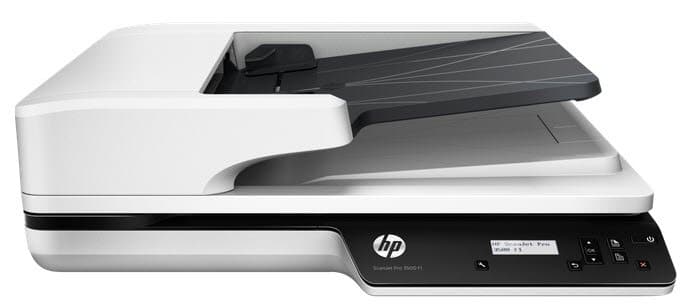
Get reliable, high-speed scanning for complex projects this scanner can handle 3,000 sheets per day. Scan both sides of the page at up to 50 images (25 pages) per minute. HP EveryPage helps avoid misfeeds and simplifies your workflow. Ideal for small and medium businesses that want versatile, full-featured scanning for everything from quick, ad-hoc tasks to complex projects.
Features:
- Capture both sides of the page even mixed media in one pass, at up to 50 images (25 pages) per minute. Reliably handle 3,000 sheets per day from the 50-sheet ADF.
- Simplify your workflow and save time. Everyday scanning and complex projects are faster and easier with an LCD control panel, one-touch scans, custom profiles, and scan-to-cloud tools.
- Ensure your scans come out with excellent quality. Automatically capture, edit, and process text from documents, and avoid distorted text when scanning from books.
Product Specifications
| Scanner type | Flatbed, ADF |
|---|---|
| Scan resolution, optical | Up to 600 dpi (colour and monochrome, ADF); Up to 1200 dpi (colour and monochrome, flatbed) |
| Duty cycle (daily) | 3,000 pages (ADF) |
| Bit depth | 24-bits external 48-bits internal |
| Levels of grayscale | 256 |
| Multifeed detection | Yes |
| Scan size, maximum | 216 x 297 mm |
| Media types | Paper (banner, inkjet, photo, plain), envelopes, labels, cards (greeting, index) |
| Media weights, supported ADF | 45 to 120 g/m² |
| Scan file format | For text & images: PDF, JPEG, PNG, BMP, TIFF, TXT (text), RTF (rich text) and searchable PDF |
| Scan input modes | Scan front-panel function for Save as PDF, Save as JPEG, Email as PDF, Email as JPEG, Send to Cloud, Everyday Scan and Save as Editable Text (OCR). HP Scan in Windows OS, HP Easy Scan/ICA in Mac OS and thrid parties applications via TWAIN. |
| Control panel | 2-line LCD; 5 buttons (Simplex/Duplex, Power, Cancel, Back and Tools/Maintenance) |
| Automatic document feeder capacity | Standard, 50 sheets |
| Automatic document feeder scan speed | Up to 25 ppm/50 ipm (300 dpi) |
| Scanning options (ADF) | Single pass E-Duplex |
| Scan size (ADF), maximum | 216 x 3100 mm |
| Compatible operating systems | Windows 10 (32-bit/64-bit), Windows 8.1 (32-bit/64-bit), Windows 8 (32-bit/64-bit), Windows 7 (32-bit/64-bit); Mac OS X Mavericks 10.9, OS X Yosemite 10.10 |
| Mac compatible | Yes |
| Connectivity, standard | Hi-Speed USB 2.0 and USB 3.0 |
| Twain version | TWAIN Certified. Version 2.1 |
| Power | Input voltage: 90 to 264 VAC, 50/60 Hz |
| Power consumption | 4.51 watts (ready), 1.40 watts (sleep), 0.22 watts (auto-off), 0.22 watts (manual-off) [1] |
| Energy efficiency | ENERGY STAR certified |
| Operating temperature range | 10 to 35°C |
| Recommended operating humidity range | 15 to 80% RH (non-condensing) |
| Dimensions (W x D x H) | 460 x 387 x 145 mm |
| Weight | 5.58 kg |
| What's in the box | HP ScanJet Pro 3500 f1 Scanner; HP ScanJet Pro 3500 f1 Flatbed Scanner Engine; Install Guide; HP Scan Software & Drivers CD; HP Bonus Pack Software CD; Supporting flyers; Cushions; USB cable; Power adapter; Power cords |
| Software included | HP Scanner Device Driver, HP WIA Scan Driver, HP TWAIN Scan Driver (Certified), HP Scan, HP Scanner Tools Utility, HP Event (Button) Handler, HP Windows Installer, I.R.I.S. Readiris Pro, I.R.I.S. Cardiris, Nuance PaperPort, LPDF (file with link to download software); No Mac Software on CD |
| Cable included | Yes, 1 USB cable |
Reviews (0)
You must be logged in to post a review.
Product Questions & Answers
Questions & Answers
There are no questions yet. Be the first to ask a question about this product.
Only registered users are eligible to enter questions




















































































































































Reviews
Clear filtersThere are no reviews yet.