














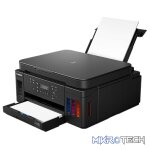
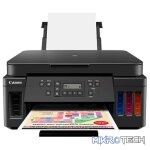

Features:
Multifunctionality meets high yields with smart connectivity
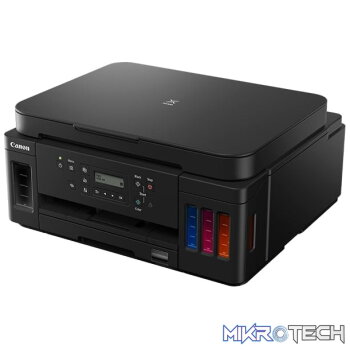
Print, scan, copy and connect to the cloud via the Canon PRINT app. Refill ink tanks with enhanced mess-free bottles, boost uptime with a 350-sheet plain paper capacity and print up to 18,000 pages from 3 black bottles or 7,700 pages from a colour set, keeping the quality with a low cost-per-page.
Convenient and compact
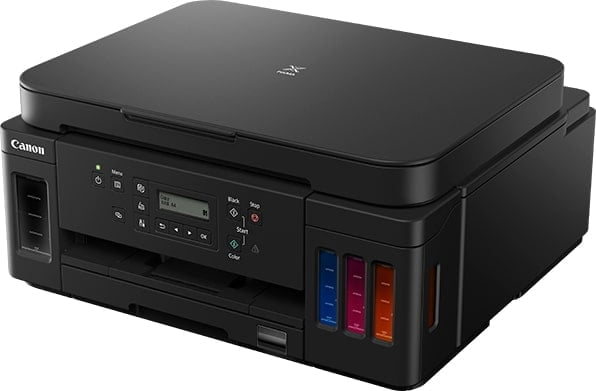
Multifunctionality and a tiltable front panel with 2-Line LCD ensure compactness and practicality, ideal for budding entrepreneurs at home or a small office.
Superb printing yields
Print up to 18,000 pages from 3 black bottles or 7,700 pages from a colour set, refill with fuss-free bottles and keep working with auto 2-sided printing and a 350-sheet plain paper capacity.
Smart connectivity
Print, scan, copy and connect to the cloud via the Canon PRINT app and PIXMA Cloud Link. Connect via Ethernet and print with AirPrint (iOS), Mopria (Android) or Windows 10 Mobile.
Clear and sharp
Stay professional with fast printing speeds and pigment black ink for crisp, sharp text. Print high-quality borderless photos in sizes of up to A4 with the vivid colour inks.
Full integration
Remotely monitor your printer’s ink levels, usage and status with the Management Information Base for total control.
Integrated ink tanks
4 high-yield refillable ink tanks for low running costs.
High page yield
Up to 18,000 pages from 3 black ink bottles or 7,700 pages from a set of colour inks.
350-sheet capacity
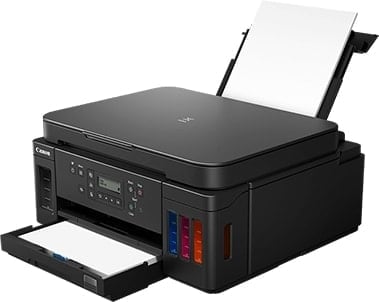
Large plain paper capacity.
Full connectivity
Ethernet and Wi-Fi
Smartphone ready
Get complete control with the Canon PRINT app (iOS and Android)
Top quality, full speed
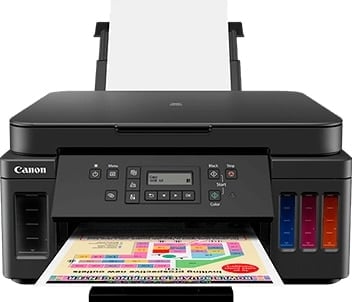
Print sharp black text and vivid borderless photos in sizes up to A4
Easy control
Enjoy easy usability and control via the 2-Line mono LCD with tiltable front panel
Auto 2-Sided Printing
Save time with automatic duplex printing
| Functions | Wi-Fi, Ethernet, Print, Copy, Scan |
|---|---|
| Print Resolution | Up to 4800 x 1200 dpi |
| Print Technology | 2 FINE Cartridges (Black and Colour)Refillable ink tank printer |
| Mono Print Speed | Approx. 13.0 ipm |
| Colour Print Speed | Approx. 6.8 ipm |
| Photo Print Speed | Borderless 10x15cm : Approx. 37 seconds |
| Borderless Printing | Yes A4, LTR, 4″x6″, 5″x7″, 7″x10″, 8″x10″, Square(5″x5″, 4″x4″, 89x89mm) |
| Two Sided Printing | Auto Duplex Print (A4, A5, B5, Letter – Plain Paper) |
| Standard Ink Cartridges | GI-40 GI-40 GI-40 GI-40 |
| Cartridge Yield (Plain paper) | A4 colour documents printingBlack: 6,000 pagesColour: 7,700 pages* Estimated supplemental yield |
| Cartridge Yield (Photo print) | 10x15cm colour photo printingColour: 2,200 photos* Estimated supplemental yield”9″ sty |
| Paper Types | Plain PaperHigh Resolution Paper (HR-101N)Photo Paper Plus Glossy II (PP-201)Photo Paper Pro Platinum (PT-101)Photo Paper Pro Luster (LU-101)Photo Paper Plus Semi-gloss (SG-201)Glossy Photo Paper “Everyday Use” (GP-501)Matte Photo Paper (MP-101)Envelope |
| Maximum Paper Input | Rear Tray: Max. 20 sheets (photo paper) or Max. 100 sheets (plain paper)Cassette: Max. 250 sheets (plain paper) |
| Paper Sizes | Rear Tray: A4, A5, B5, LTR, LGL, 4″x6″, 5″x7″, 7″x10″, 8″x10″Envelopes(DL, COM10), Square (5″ x 5″, 4″x4″, 89x89mm), Card Size(91 x 55mm)[Custom size] width 55mm – 215.9 mm, length 89mm – 676mmCassette: A4, A5, B5, LTR[Custom size] width 148.0 mm – 215.9 mm, length 210mm – 297mm |
| Paper Weight | Rear Tray: Plain paper: 64 – 105 g/m²Canon photo paper: up to 300 g/m² (Photo Paper Pro Platinum PT-101)Cassette: Plain paper: 64 – 105 g/m² |
| Scanner Type | CIS flatbed photo and document scanner |
| Scanner Resolution (Optical) | 1200 x 2400 dpi |
| Line Scanning Speed | Colour: 3.5 ms/line(300dpi)Greyscale: 1.5 ms/line(300dpi) |
| Scanning Depth (Input / Output) | Colour: RGB each 16bit/8bitGreyscale: 16 bit / 8 bit |
| Maximum Document Size | A4/LTR |
| Copy Speed | sFCOT: Approx. 20 secsESAT: Approx. 5 sec |
| Multiple Copy | 99 copies (max.) |
| Copy Functions | Document Copying, Photo Copying, Borderless copy, 2-sided copy, 2-on-1 and 4-on-1 copy, Frame erase copy, ID copy |
| Copy Zoom | 25 – 400% (in 1% increments)Fit to pageA5 to A4, B5 to A4, A4 to A5 and A4 to B5 |
| Display Type & Size | Full Dot LCD |
| Display Languages | 32 Languages Selectable: Japanese/English(mm & inch) / German / French / Italian / Spanish / Dutch / Portuguese / Norwegian / Swedish / Danish / Finnish / Russian / Czech / Hungarian / Polish / Slovene / Turkish / Greek / Simplified Chinese/Traditional Chinese / Korean / Indonesian / Slovakian / Estonian / Latvian / Lithuanian / Ukrainian / Romanian / Bulgarian / Croatian / Vietnamese |
| Interface Type - PC / Mac | Hi-Speed USB (B Port)Ethernet: 10/100Mbps (auto switchable)Wi-Fi: IEEE802.11 b/g/nWi-Fi Security: WPA-PSK, WPA2-PSK, WEP, Administration passwordWireless LAN Frequency Band: 2.4GHz |
| Interface Type - Other | Canon PRINT Inkjet/SELPHY appEasy-PhotoPrint EditorMessage In Print appPIXMA Cloud LinkCanon Print Service Plugin (Android)Google Cloud PrintApple AirPrintWireless DirectAccess Point ModeLAN/WLAN PictBridgeMopria (Android) |
| Supported Operating Systems | Windows 10, Windows 8.1, Windows 7 SP1Operation can only be guaranteed on a PC with pre-installed Windows 7 or later.Printer driver and IJ Network Device Setup Utility are available with following OS.Windows Server 2008 R2 SP1, Windows Server 2012 R2, Windows Server 2016OS X 10.10.5~OS X 10.11, macOS 10.12~macOS 10.14 |
| Supported Mobile Systems | iOS, Android, Windows 10 Mobile |
| Minimum System Requirements | Windows: 2.0GB or moreMac: 1.0GB or moreNote: for bundled software installation. The necessary amount of hard disk space required.Display: 1024 x 768 XGA |
| Software Included | MP DriverIJ Printer Assistant ToolEasy-PhotoPrint Editor (download) |
| Weight | approx. 8.1kg |
| Dimensions (W x D x H) | approx. 403 x 369 x 195 mm |
| Acoustic Noise Levels | approx. 50.5dB(A) |
| Operating Temperature | 5-35°C |
| Operating Humidity | 10-90%RH (no dew condensation) |
| Power Source | AC 100-240V, 50/60Hz |
| Power Consumption | Off: Approx. 0.3WStandby (connected to PC via USB): Approx. 0.8W (scanning lamp off)Standby (all ports connected): Approx. 1.7W (scanning lamp is off)Time to enter Standby mode: 11min 10secCopying (USB connection to PC): Approx. 15W |
| Typical Electricity Consumption (TEC) | 0.2kWh |
| Brand | Canon |
You must be logged in to post a review.
Questions & Answers
There are no questions yet. Be the first to ask a question about this product.



















































































































































Reviews
Clear filtersThere are no reviews yet.