













Images & Specifications Are For Illustrative Purposes Only & May Differ From The Actual Product. E&OE

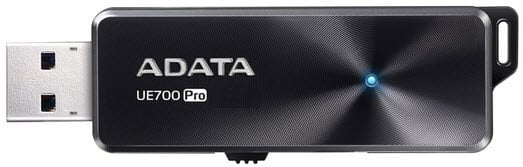
Adata UE700 Pro 64Gb USB 3.0 Flash Drive
R449.99 incl. VAT
Only 8 left in stock
Overview:
Speed things up with the ADATA UE700 Pro USB flash drive featuring read/write speeds of up to 360/180MB/s and up to 256GB of storage capacity. Whats more, it sports an ultra-thin 7mm form factor and a brushed aluminum surface that highlights the sleek concentric lines that emanate from the beautiful blue LED indicator.
Features:
Quick-Slide Capless Design
The USB connector is concealed in a compact body, fully protected without the need for a drive cap. A simple thumb swipe forward makes it ready to use, and the reverse motion stows the connector for storage or travel.
High-Speed USB 3.1 for Fast Data Transfers
The UE700 Pro sports fast read/write speeds of up to 360/180MB per second. That means you can transfer a 4GB high-resolution movie file in just 22 seconds. Now thats fast!
Ultra-Thin 7mm Form Factor
At a mere 7mm thin, the UE700 Pro is slim, compact, and easy to carry around with you.
No More Limits with More Capacity
In an era of 4K videos and high-resolution photos, you can never have too much storage capacity. With more storage, you can capture hi-res photos and videos without fear of running out of space.
An Easy-Go Design with Lanyard Hole
A lanyard hole offers convenience and personalization. Attach the UE700 Pro to a lanyard or keychain for easy carrying, or accessorize it with something thats uniquely you.
| Capacity | 64GB |
|---|---|
| Color | Black |
| Dimensions (L x W x H) | 63 x 23 x 7mm / 2.5 x 0.9 x 0.3″ |
| Weight | 11g / 0.4oz |
| Interface | USB 3.1 (backward compatible with USB 2.0) |
| Performance | Up to: 360MB/s (Read), 180MB/s (Write) (256GB model) |
| System Requirements | Windows XP, Vista, 7, 8, 8.1, 10, Mac OS X 10.6 or later, Linux kernel 2.6 or later, with no device driver needed |
| Accessories | USB 3.1 cable, Quick Start Guide |
| Note | 1. Performance may vary by hardware configuration and software application. 2. Some of the listed capacity on a Flash storage device is used for formatting and other functions and is not available for data storage. Actual available capacity smaller than that listed on products. |
You must be logged in to post a review.
Questions & Answers
There are no questions yet. Be the first to ask a question about this product.



















































































































































Reviews
Clear filtersThere are no reviews yet.